
Codex (OpenAI / New Platform)
Codex integration guide for Tokaify
Keep these values handy
The examples below use the official Tokaify deployment:
- OpenAI-compatible Base URL (used in Codex CLI
config.tomland most generic clients):https://api.tokaify.com/v1 - API Key: the full
sk-...secret copied from the console - Model: choose a model that is enabled for your account, such as
gpt-5.4
Step 1: Create a key in Tokaify
- Open your platform console and sign in.
- Go to Token Management.
- Click
Add Tokenand enter a token name. - If needed, also configure quota, allowed models, IP restrictions, and expiration.
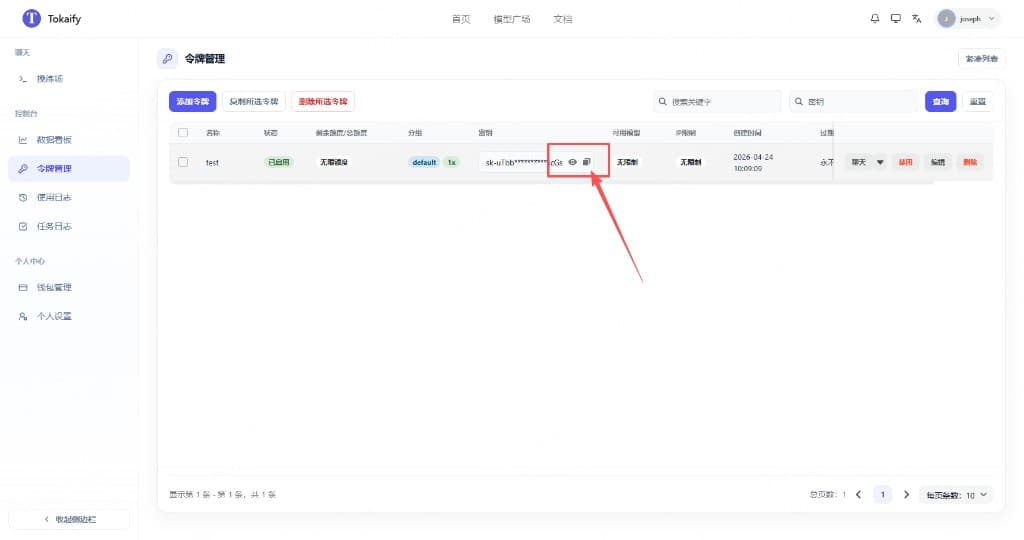
- After saving, open the action menu for that key and click
Copy Access Code. If you need to confirm endpoint or auth details, clickView Auth Info.
Important
When connecting a client, always use the full secret directly. Do not remove the sk- prefix.
Step 2: Parameter mapping
| Scenario | Field | Value | Notes |
|---|---|---|---|
| Codex CLI | base_url in config.toml | https://api.tokaify.com/v1 | /v1 is required here |
| Codex CLI | OPENAI_API_KEY in auth.json | sk-... | Use the full secret |
| Generic OpenAI-compatible clients | Base URL / API Base / Endpoint | https://api.tokaify.com/v1 | Most tools like Cursor, Cline, and Cherry Studio use this |
| Any client | Model | gpt-5.4 or another model enabled for your account | Do not force a model your account cannot access |
Step 3: Configure Codex
The easiest approach is to copy the secret directly from the token list, then configure config.toml and auth.json as shown below.
1. Locate the Codex config directory
~/.codex/%USERPROFILE%\.codex\If the directory does not exist:
- On macOS / Linux, run
mkdir -p ~/.codex - On Windows, press
Win + Rand enter%USERPROFILE%\.codex; if it does not open, create the directory manually
2. Put the following at the top of config.toml
~/.codex/config.toml%USERPROFILE%\.codex\config.tomlMake sure the following block appears near the top of config.toml:
model_provider = "OpenAI"
model = "gpt-5.4"
review_model = "gpt-5.4"
model_reasoning_effort = "xhigh"
disable_response_storage = true
network_access = "enabled"
windows_wsl_setup_acknowledged = true
model_context_window = 1000000
model_auto_compact_token_limit = 900000

[model_providers.OpenAI]
name = "OpenAI"
base_url = "https://api.tokaify.com/v1"
wire_api = "responses"
requires_openai_auth = true
3. Create or overwrite auth.json
~/.codex/auth.json%USERPROFILE%\.codex\auth.json{
"OPENAI_API_KEY": "sk-your-full-secret"
}4. Field reference
| File | Field | Value | Notes |
|---|---|---|---|
config.toml | model_provider | OpenAI | Keep it exactly as shown |
config.toml | model | gpt-5.4 or another available model | Default model for the main conversation |
config.toml | review_model | gpt-5.4 or another available model | Review model; it can match the main model |
config.toml | base_url | An OpenAI-compatible Base URL such as https://api.tokaify.com/v1 | /v1 is required |
config.toml | wire_api | responses | Keep it exactly as shown |
auth.json | OPENAI_API_KEY | Full sk-... secret | Copy the complete secret from the token list |
If your account does not have access to gpt-5.4, replace model and review_model with a model you can actually use.
5. If you are not using the official Codex CLI
Some wrappers provide a graphical provider settings page. In that case, use the following mapping:
| UI field | Value |
|---|---|
| Provider | OpenAI or OpenAI Compatible |
| API Key | sk-... |
| Base URL | https://api.tokaify.com/v1 |
| Model | Select a model available to your account |
Step 4: Verify the setup
The simplest check is to request the model list once:
curl https://api.tokaify.com/v1/models \
  -H "Authorization: Bearer sk-your-token"
If a valid model list is returned, both the key and gateway endpoint are configured correctly.
FAQ
Why does config.toml need /v1
Because Codex CLI expects an OpenAI-compatible API base URL that includes the versioned path. Use https://api.tokaify.com/v1 and do not omit /v1.
Why am I getting 401 or 403
Check these first:
- Whether you copied the full
sk-...secret - Whether the token is disabled, expired, or out of balance
- Whether the current model is allowed by that token
- Whether an IP restriction is blocking the request
Why am I getting 404
Most of the time, the endpoint is incorrect:
- In Codex CLI
config.toml,base_urlshould behttps://api.tokaify.com/v1 - In generic OpenAI-compatible clients,
Base URLshould also behttps://api.tokaify.com/v1
How is this guide?
Last updated on